Starting a Business: Business & Sales Tax License Information
When starting a business in Timnath, your first step is to register with the Town for the taxes related to your business’ services. Timnath uses third-party systems for the processing of our business licenses, and sales tax collection. These systems allows you to create an account and complete the entire process online.
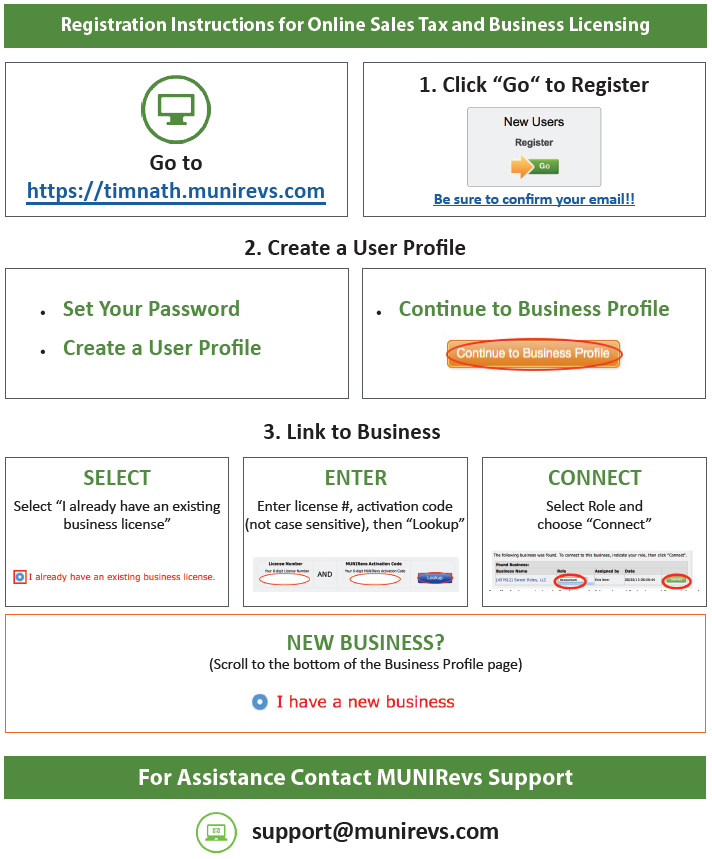
For sales tax filing and remittances, all businesses will be required to create an account/profile in order to be registered. This account set-up will be a one-time process and can be started by visiting our MUNIRevs site.
Beginning in September 2026, the Town of Timnath transitioned to MyGov for business licensing services. If your business is required to obtain a Town of Timnath business license, please submit your application or renewal through the MyGov Portal. Businesses that qualify for a remote business license should continue to apply through MUNIRevs site.

Contact Information
For general inquiries:
970-224-3211
or
Online Registration Made Easy!